


As an Amazon Associate, FilamentPicks earns from qualifying purchases. This doesn’t affect our findings — see our research method.
Bambu AMS jamming is the problem we see reported more than any other in this ecosystem. The AMS is the feature that sold most of us on these printers — and the one that generates the most frustration when it stops feeding. Feed failures, filament jams, humidity alerts and PTFE clogs have filled thousands of r/BambuLab threads and forum posts since the X1 Carbon launched. So instead of adding one more opinion, we did something different: we aggregated the data.
This report pulls together Bambu Lab’s own AMS troubleshooting wiki, the official community forum, and the documented community guides that themselves summarise thousands of user reports. The goal is simple — rank what actually jams the Bambu AMS by how often each cause shows up in the wild, and pair each one with the fix the community reports actually works.
How we built this report. Sources: Bambu Lab official AMS loading/unloading + PTFE-wear troubleshooting wiki, the Bambu Lab Community Forum, and aggregated community troubleshooting guides + r/BambuLab reports current to June 2026. Method: we grouped every reported failure by where it happens in the feed path (slot → buffer/PTFE → extruder), then ranked causes by how frequently they recur across these sources. Honesty note: this is a research-based synthesis of official documentation and community-reported experience — not in-house lab testing.
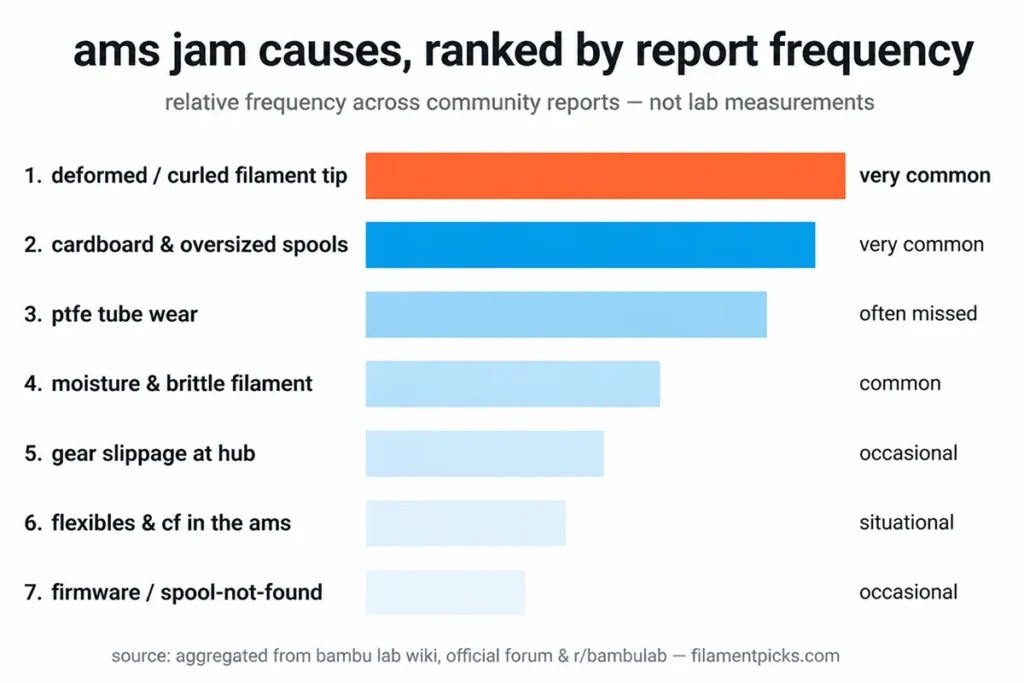
Frequencies are relative bands, not controlled measurements.
The Data: Bambu AMS Jamming Causes, Ranked by Frequency
 Every AMS jam happens at one of three stages: the slot (first-stage feeder), the buffer/PTFE run, or the extruder. Here is what the combined sources surface most often.
| # | Failure mode | Stage | Primary culprit (community-reported) | The fix that works |
|---|---|---|---|---|
| 1 | “Unable to feed filament into extruder” | Slot | Deformed / curled filament tip after a mid-print unload | Snip 10–15 cm off the end at a clean 45° angle, then reload — the most common single fix |
| 2 | Spool won’t turn or won’t feed | Slot | Cardboard or oversized / non-standard spool geometry | Use an AMS-spec plastic spool (~200 mm dia, 55–68 mm wide) or a cardboard-spool adapter ring |
| 3 | Filament reaches buffer then stops | PTFE | Worn or scored PTFE tube creating friction | Inspect monthly; replace at the first sign of scoring (2.5 mm ID / 4 mm OD) |
| 4 | Brittle snap / fragment stuck in tube | PTFE | Moisture-embrittled or carbon-fiber filament; a broken fragment blocks the path | Dry the spool before printing; clear any fragment from the PTFE run |
| 5 | Motor spins, filament doesn’t move (dents on filament) | Hub | Gear slippage at the internal hub | Tighten the 4 internal-hub screws; replace the extrusion-wheel assembly if it persists |
| 6 | TPU / flexible buckles and jams | PTFE | Flexible filament compressing inside the rigid PTFE tube | Run flexibles from an external spool — never through the AMS |
| 7 | “Spool not found” / random load fail mid-print | Detection | Firmware + RFID edge cases (worst with TPU, matte PLA, third-party) | Update AMS firmware; clean the Hall sensor; reseat the spool |
| 8 | No RFID / manual profile needed | Detection | Third-party filament has no RFID tag | Not a fault — select the profile manually (OrcaSlicer community profiles help) |
Frequency band, top to bottom: rows 1–2 are the most common by a wide margin; rows 3–5 are common; rows 6–8 are situational or by-design rather than true faults.
The Single Most Preventable Cause
If you take one thing from this report: most Bambu AMS jamming is not a hardware defect. Bambu’s own wiki states that the majority of AMS failures come down to usage — and the two usage problems that bite the most people are a deformed filament tip and a spool the AMS can’t physically turn.
Both are ten-second fixes once you know the pattern. A curled or chewed tip left over from a mid-print unload simply won’t seat in the feeder — the classic “it works if I push it in slightly” symptom. And a cardboard core or an oversized 2 kg spool that drags in the bay produces a “stuck spool” warning that has nothing to do with the AMS mechanics themselves.
Cause by Cause: What the Reports Say
1. Deformed or curled filament tip (the #1 jam)
After any unload, the filament end can be left bent, chewed, or fused into a slight blob. The first-stage feeder can’t grip it, so nothing leaves the slot. The fix is universal across every source: unload, cut 10–15 cm off to get past the deformed section, make a clean 45° tip, and reload. Snipping the tip before every spool change costs ten seconds and prevents most slot-stage jams outright.
2. Cardboard, oversized & non-standard spools
The AMS is picky about geometry. Standard 1 kg plastic spools (~200 mm diameter, 55–68 mm wide) feed reliably; oversized 2 kg spools and bare cardboard cores are where problems start. Cardboard spools shed dust and can bind in the bay — Bambu recommends a printed adapter ring for them. If you run a lot of third-party filament, brands that ship AMS-friendly plastic or cardboard-with-adapter spools (Overture, eSUN, Polymaker PolyTerra are the names that come up most) save you the headache.
3. PTFE tube wear (the most-missed cause)
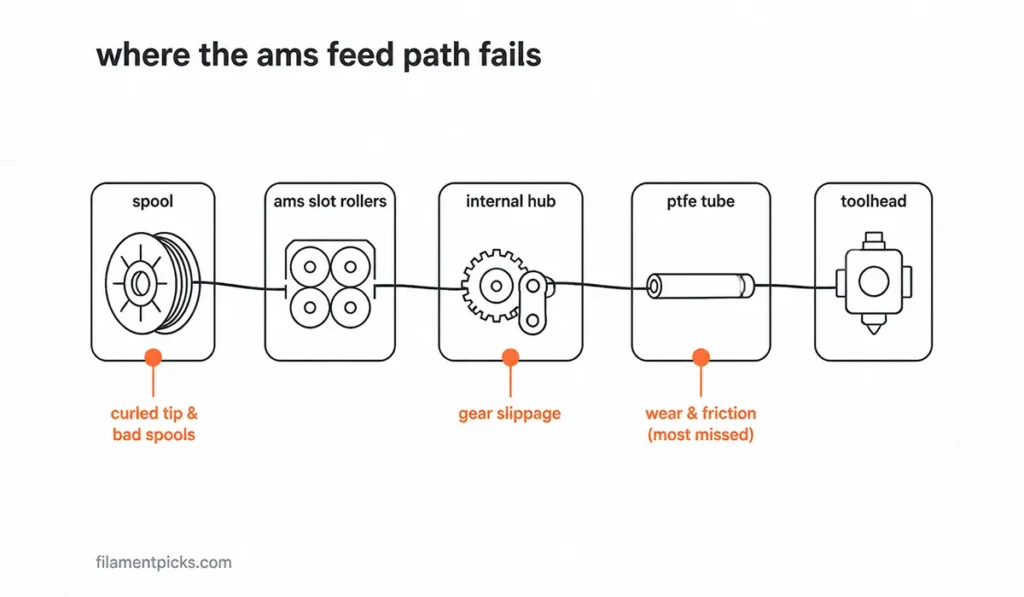 When filament leaves the slot fine but stalls between the AMS and the toolhead, the PTFE tube is the usual culprit — the Bambu AMS jamming cause almost nobody checks first. It’s the most common location for wear-induced friction, and it’s the part people forget exists.
Inspect the tubes monthly and replace at the first sign of scoring or visible expansion — spares are a couple of dollars each, far cheaper than a failed 12-hour multicolor print. Exact spec matters: 2.5 mm internal / 4 mm external diameter.
Non-standard sizes add friction and create new feeding problems.
4. Moisture & brittle filament
The AMS is sealed and holds desiccant, but it is not a dryer and it is not airtight. Hygroscopic materials (PETG, Nylon, TPU) and carbon-fiber blends absorb moisture in days, not months, and wet or brittle filament snaps inside the feed path — leaving a fragment that blocks everything behind it. Dry hygroscopic spools before loading and keep desiccant fresh. Our filament storage guide covers the routine; for moisture-prone PETG specifically, see the PETG print settings guide.
5. Gear slippage at the internal hub
If the motor spins but the filament doesn’t move — and you can see evenly-spaced dents ground into the filament — the internal hub gear is slipping. Tightening the four screws on the internal hub unit fixes it in most cases. If it persists, the active extrusion-wheel assembly is worn and needs replacement. One caution from the community: don’t over-tighten, or you swap one failure mode (slipping) for another (excessive grip that scrapes the filament).
6. Flexibles & carbon fiber don’t belong in the AMS
This one isn’t a fault to fix — it’s a constraint to respect. TPU and other flexibles buckle inside the rigid PTFE tubing during retraction and jam in a way that often needs disassembly to clear. Carbon-fiber and other brittle composites are similarly AMS-hostile. Run both from an external spool with the shortest possible path. Our best TPU filament guide covers which flexibles feed best and the external-spool setup; the Filament Compatibility Checker flags AMS limitations per material automatically.
7. “Spool not found” & firmware-related load failures
A wave of random “spool not found” and “failed to load” errors — worst with TPU, matte PLA and third-party brands — has been partly addressed by AMS firmware updates, with users reporting smoother multicolor transitions afterward. Keep your AMS firmware current, clean the Hall sensor with a dry swab if a slot stops detecting filament, and reseat the spool. If only one slot fails to read RFID, try flipping the spool (there’s a tag on each side) before assuming a hardware fault.
Not sure if your filament will feed? Use our interactive Bambu Filament Compatibility Checker — pick your printer and see every compatible filament with temps, AMS support and smart feed warnings. Need exact temps and drying notes? The Filament Settings Database has nozzle/bed temps and AMS notes for 19 materials, searchable and sortable.
Which Filaments Jam the AMS Most?
Pulling the material thread out of the Bambu AMS jamming reports, a clear reliability order emerges for the AMS specifically (not overall print quality):
- Most AMS-friendly: standard PLA and PETG on AMS-spec plastic spools — the bulk of trouble-free reports.
- Mostly fine with care: matte PLA and budget third-party PLA — occasional feed errors on very long prints from diameter inconsistency; dry storage and a clean tip handle most of it.
- Run external, not through the AMS: TPU and other flexibles — they buckle in the PTFE.
- Run external + hardened nozzle: carbon-fiber and glass-fiber blends — brittle in the feed path and abrasive to the hardware.
For brand-level picks that feed cleanly, see our best PETG for Bambu Lab and best filament for the A1 Mini (its AMS Lite has its own quirks — open design, so tangling matters more than PTFE wear).
The 2-Minute Routine That Prevents Bambu AMS Jamming
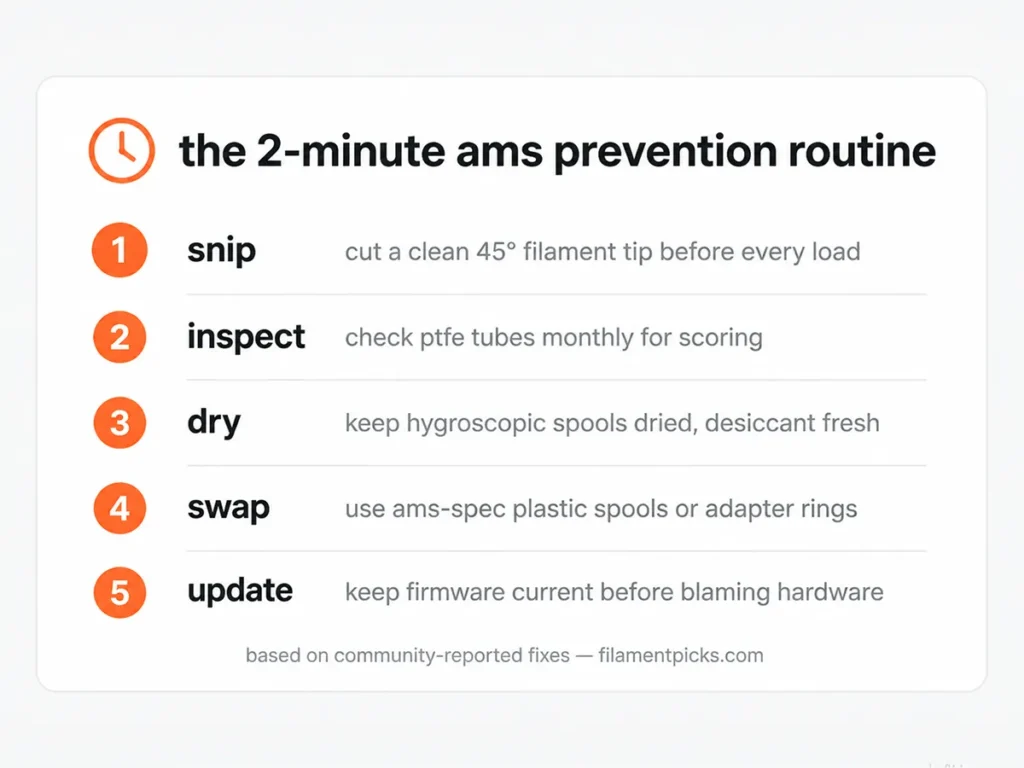 Almost every Bambu AMS jamming cause above is preventable with light, routine maintenance. The community consensus boils down to five habits:
- Snip the filament end at a clean 45° angle before every spool change.
- Inspect the PTFE tubes monthly; replace at the first sign of scoring.
- Dry hygroscopic spools (PETG, Nylon, TPU) before loading and keep desiccant fresh.
- Keep AMS slots closed when not loaded so dust doesn’t reach the feeder.
- Run flexibles and carbon fiber from an external spool, never through the AMS.
The biggest single cause of recurring jams is treating the AMS as set-and-forget. It’s a consumable system that needs two minutes of attention, not a sealed black box.
What Helps (Gear That Prevents Jams)
A short, honest kit covers most of the Bambu AMS jamming failure modes above: a filament dryer for moisture-driven brittle snaps, silica-gel desiccant packs to keep slots below 20% RH, a spare PTFE tube (2.5/4 mm) to swap worn tubes, and AMS-friendly filament (Overture / eSUN) with spool geometry designed to feed. (Buying links coming soon.)
Frequently Asked Questions
Why does my Bambu AMS keep jamming?
Bambu AMS jamming most often comes down to one of two things: a deformed filament tip from a previous unload, or a spool the AMS can’t turn (cardboard core or oversized geometry). Snip a clean 45° tip and switch to an AMS-spec plastic spool before assuming a hardware fault.
Can the Bambu AMS handle TPU?
Standard 95A TPU can technically feed through a full AMS but slowly and with a higher failure rate, because flexibles buckle in the PTFE tubing. For reliability, run TPU from an external spool. The AMS Lite on the A1 Mini is not recommended for TPU at all.
Does third-party filament jam the AMS?
It can if the spool geometry is wrong — in the Bambu AMS jamming reports, oversized or bare-cardboard spools are the issue, not the filament itself. Brands on AMS-spec plastic spools (or cardboard with a printed adapter ring) feed as reliably as Bambu’s own. Third-party filament also lacks RFID, so you select the profile manually.
What’s the most common AMS error message?
“Unable to feed filament into the extruder.” It can fail at three stages — slot, PTFE buffer, or extruder — but the most frequent root cause is a deformed filament tip that the feeder can’t grip.
How often should I replace the AMS PTFE tubes?
Inspect monthly and replace at the first sign of scoring or visible expansion — worn tubes are a leading cause of Bambu AMS jamming. Use the correct spec (2.5 mm internal / 4 mm external); non-standard sizes add friction and cause new feeding problems.
Related Guides
- Bambu Filament Compatibility Checker (tool)
- Bambu Filament Settings Database (tool)
- Best TPU Filament for Bambu Lab
- How to Store Filament Properly
- Bambu Lab PETG Compatibility Guide
- Best Filament for Bambu A1 Mini
Affiliate disclosure: FilamentPicks is a participant in the Amazon Associates Program and other affiliate programs. We may earn a commission on qualifying purchases made through links on this page, at no extra cost to you. This never influences our research or findings.