

Reliable PETG starts with dry filament, the correct material profile, and a conservative baseline. Use the table below for your Bambu Lab printer, then tune one variable at a time based on the symptom you actually see.
Useful Bambu tools: Filament Finder · Settings Database · Compatibility Checker
Copy These PETG Settings First
Choose the nearest printer-family column as a conservative baseline, then use the current manufacturer profile for your exact printer and PETG whenever one exists. Coverage includes all 14 Bambu Studio profiles: X1, X1C, X1E, P1P, P1S, P2S, X2D, H2S, H2D, H2D Pro, H2C, A1, A1 Mini and A2L.
| Setting | Enclosed X / H | Enclosed P | Open P1P / A | Notes |
|---|---|---|---|---|
| Nozzle Temp | 240–250 °C | 240–250 °C | 235–245 °C | Start at 240, raise if underextruded |
| Bed Temp | 70–80 °C | 70–80 °C | 65–75 °C | Textured PEI: 75–80 °C |
| Enclosure / Door | Vent if chamber heat builds | Vent if chamber heat builds | Open frame | PETG does not require a heated chamber; vent the enclosure if heat builds |
| Print Speed | 150–200 mm/s | 150–200 mm/s | 100–150 mm/s | Slow down for overhangs |
| First Layer Speed | 30–40 mm/s | 30–40 mm/s | 25–35 mm/s | Never skip this |
| Fan Speed | 50–70% | 50–70% | 60–80% | Raise cautiously for bridges; too much cooling can weaken layer bonding |
| Retraction | Profile default; tune only after drying | Profile default; tune only after drying | Profile default; tune only after drying | Dry the spool and tune temperature before increasing retraction |
| Layer Height | 0.2 mm | 0.2 mm | 0.2 mm | 0.15 for detail, 0.28 for speed |
| Flow Rate | 95–100% | 95–100% | 95–100% | Tune with flow calibration cube |
Overture is the value-oriented Amazon choice; Polymaker PETG adds a dedicated ecosystem and 15% off the first direct order.
Use code BALUTAVLAD on your first Polymaker order. Affiliate links may earn FilamentPicks a commission.
FilamentPicks is reader-supported. Some links on this page are affiliate links. As an Amazon Associate I earn from qualifying purchases. This does not change the price you pay.
Bambu Lab printers are fast out of the box — but their default PETG profiles are a starting point, not an endpoint. Push too fast and you get stringing. Run too cold and layers delaminate. Leave the defaults on the A1 and you miss the fact that its open frame needs different cooling than the enclosed X1C.
This guide gives you the exact petg print settings bambu lab owners actually use, explains why each one matters, and ends with a quick-tune checklist so you can dial in a new brand of filament in under an hour.
Already know which PETG to run? Jump to our roundup: Best PETG Filament for Bambu Lab — 7 Brands Researched.
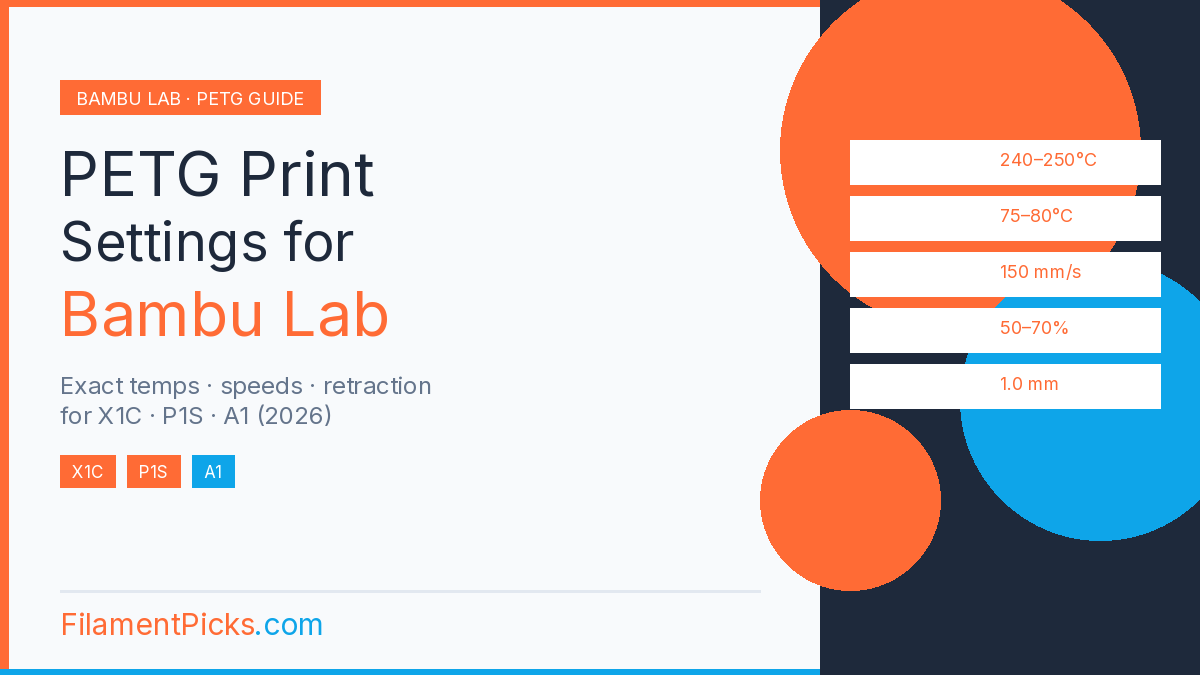
1. PETG Print Settings Bambu Lab: Temperature
👉 See also: top PETG picks for Bambu Lab (2026).
Nozzle Temperature
PETG has a wider printing window than PLA, but that flexibility can mask problems. Too low and you get poor layer adhesion and a rough surface. Too high and you get stringing and oozing.
- Enclosed X/H and P1S/P2S: 240–250 °C; keep the stock nozzle unless the exact PETG is abrasive
- Open P1P / A1 / A1 Mini / A2L: 235–245 °C as a conservative baseline
- Start at 240 °C and raise in 5 °C increments if you see underextrusion
Some premium PETG brands like eSUN ePETG or Polymaker PolyLite run better at the lower end of this range. Cheap no-name filament usually needs the higher end. Always check the spool label — the manufacturer’s recommendation is a real data point.
Bed Temperature
PETG sticks aggressively to cold PEI and releases well from warm PEI — which is exactly what you want.
- Smooth PEI: 70–75 °C
- Textured PEI: 75–80 °C
- Cool build plate to 35–40 °C before removing the print to avoid warping
If prints are warping on an open-frame P1P or A-series printer, try a brim and reduce room drafts before changing several settings. Airflow affects open-frame machines significantly.
Enclosure Temperature (Enclosed Models)
On enclosed X1-series, P1S/P2S, X2D and H2-series printers, start from the exact Bambu Studio PETG profile and vent the enclosure if heat builds. PETG does not require an actively heated chamber.
On the open-frame P1P, A1, A1 Mini and A2L, reduce drafts and use the open-frame baseline in the table above.
2. Speed Settings for PETG Print Settings Bambu Lab
PETG is more viscous than PLA, which means it needs more time to properly bond between layers. Running at PLA speeds causes stringing, zits, and inconsistent extrusion.
- Enclosed X/H and P1S/P2S perimeter speed: 150–180 mm/s as a baseline
- Enclosed X/H and P1S/P2S infill speed: up to 200 mm/s as a baseline
- Open P1P / A-series perimeter speed: 100–130 mm/s as a baseline
- Open P1P / A-series infill speed: up to 150 mm/s as a baseline
- Overhangs: drop to 40–60 mm/s regardless of printer
If you see surface roughness or inconsistent lines on the outer wall, reduce perimeter speed by 20 mm/s. It is always the first tuning knob to reach for on PETG.
First Layer Speed
First layer speed deserves its own mention because it is disproportionately important. A bad first layer ruins the entire print.
- All Bambu Lab models: 25–40 mm/s
- If the first layer is lifting at corners: slow down to 20 mm/s and check bed leveling
- Never raise first layer speed to save time — it is five minutes on a three-hour print
3. Cooling and Fan Settings
PETG is unusual in that it needs cooling, but not too much. This is one of the trickiest petg print settings bambu lab owners deal with — maximum fan speed causes layer delamination, while zero fan causes stringing and surface blobs.
- Enclosed X/H and P1S/P2S: 50–70% fan speed as a starting range
- Open P1P / A1 / A1 Mini / A2L: 60–80% fan speed as a starting range
- Disable fan for the first 2–3 layers on all models
- Bridges and overhangs: max fan (100%) for those segments only
Bambu Studio lets you set fan speed overrides per layer range. Use this if you are printing something with complex overhangs in the middle of a tall part — ramp fan to 80% for those layers and drop it back down after.
4. Retraction Settings
Retraction is the most tuned setting in petg print settings bambu lab builds and also the most over-tuned. The goal is to pull the filament back far enough to stop oozing during travel — but not so far that you cause a clog or gaps at the start of the next line.
- Enclosed X/H and P1S/P2S: keep the current printer-profile default; tune only after drying
- Open P1P / A-series: keep the current printer-profile default; tune only after drying
- Retraction speed: 30–45 mm/s on all models
- If you see stringing: raise distance by 0.1 mm increments, up to 1.5 mm max
- If you see gaps or blobs at line starts: lower retraction distance
Stringing caused by retraction is covered in detail in our guide: PETG Stringing: 9 Causes and the Fix for Each — including a calibration print that identifies your exact retraction floor in one run.
5. First Layer Settings
The first layer sets up everything that follows. Bambu Lab’s automatic bed leveling and flow calibration handle most of this, but a few manual settings make a big difference.
- First layer height: 0.2–0.25 mm (slightly thicker than your standard layer height)
- First layer width: 110–120% of nozzle diameter for better adhesion
- Z-offset: run Bambu’s flow calibration before changing this manually
- Brim: 5 mm brim on the A1 for any print over 100 mm tall
The X1C supports automatic calibration in compatible workflows, while the P1S uses manual flow-dynamics and flow-rate calibration in Bambu Studio. The A1 series uses its own sensor-based dynamic-flow workflow. Run automatic bed leveling before important prints on every model.
6. Layer Height and Flow Rate in PETG Print Settings
- Standard layer height: 0.2 mm — best balance of quality and speed
- Detail prints: 0.15 mm — add 20–30% to print time
- Speed prints: 0.28 mm — good for functional parts where surface finish does not matter
- Flow rate: start at 95–100% and calibrate with a flow cube
If you are switching between PETG brands, rerun flow calibration. Different brands have slightly different actual diameters and densities, and a 3% flow rate difference is visible on the surface.
7. How to Dial In a New PETG Brand (Step-by-Step)
When you open a new spool of PETG — even a brand you have printed before — spend 30 minutes dialing it in before committing to a long print. For official baseline values, Bambu Lab’s filament wiki lists manufacturer-recommended starting points. This is the fastest workflow:
- Step 1 — Temperature tower: print a temp tower from 230–260 °C. Pick the layer that shows the best combination of surface quality and no stringing.
- Step 2 — Flow calibration cube: print a 20×20×20 mm cube and measure wall thickness with calipers. Adjust flow rate until walls match your nozzle diameter exactly.
- Step 3 — Retraction test: print a retraction test tower (many free ones on Makerworld). Find the minimum retraction that eliminates stringing.
- Step 4 — Speed test: print a benchy or similar model at your target speed. If surface is rough, drop perimeter speed 15%.
- Step 5 — Save as a custom filament preset in Bambu Studio. Label it with the brand and spool date.
This workflow takes about 45 minutes total and saves hours of failed prints. Do it once per brand, and you will not have to repeat it.
8. Common PETG Problems and the Settings Fix
| Problem | Settings Fix |
|---|---|
| Stringing | Raise retraction 0.1 mm, lower nozzle temp 5 °C, increase fan 10% |
| Warping | Raise bed temp to 80 °C, close enclosure, add 5 mm brim |
| Layer delamination | Raise nozzle temp 5 °C, reduce fan speed, slow perimeter speed |
| Surface blobs | Lower nozzle temp, increase travel speed, enable Z-hop |
| Underextrusion | Raise nozzle temp, check for partial clog, recalibrate flow rate |
| Bed adhesion failure | Clean PEI with IPA, raise bed temp, slow first layer to 25 mm/s |
✅ Recommended PETG for These Settings
Overture PETG — Works Out of the Box on Bambu Lab
Consistent diameter, dry-sealed packaging, minimal calibration needed. Our top pick after research 7 brands on X1C, P1S and A1.
View Overture PETG on Amazon →Frequently Asked Questions
What temperature should I use for PETG on Bambu Lab?
240 °C is the best starting point for petg print settings bambu lab X1C and P1S. The A1 runs slightly cooler at 235–240 °C due to its open frame. Adjust in 5 °C increments based on surface quality.
Is Bambu’s default PETG profile good enough?
It is a solid starting point, but it is calibrated for generic filament. Premium brands like Bambu’s own PETG HF or Polymaker PolyLite will print better with slightly tweaked settings — particularly lower temperature and adjusted fan speed.
Why is my PETG stringing on the X1C even with the enclosure closed?
The most common cause is nozzle temperature being too high. Drop to 240 °C and increase retraction to 1.0 mm. If stringing persists, check our full PETG stringing guide — it covers all 9 causes with exact fixes.
Do I need a hardened steel nozzle for PETG?
No — PETG is not abrasive and works fine with a standard brass nozzle. Hardened steel is only necessary if you are printing filaments with carbon fiber, glass fiber, or metal fill. Stick with brass for standard PETG.
Should I use a brim with PETG on Bambu Lab?
On the X1C and P1S with the enclosure closed, PETG rarely needs a brim for parts under 150 mm. On the A1 with its open frame, use a 5 mm brim for anything tall or narrow to prevent warping from air currents.
What flow rate should I use for PETG?
For PETG print settings Bambu Lab profiles, start at 95–100% flow and calibrate with a flow calibration cube. If walls are thicker than your nozzle diameter, reduce flow. If thinner, increase. A 2–3% adjustment is usually all that is needed between brands.
What PETG to Actually Run at These Settings
Getting the petg print settings bambu lab right is half the job — the filament itself matters just as much. We researched seven PETG brands on the Bambu Lab X1C and ranked them by print quality, bed adhesion, and consistency across spools.
See the full rankings: Best PETG Filament for Bambu Lab — 7 Brands Researched — with our top pick for everyday printing and a budget option that punches above its price.
If you are still deciding between PLA and PETG, read our comparison first: PLA vs PETG vs PETG-HF: Which Filament to Use When.