
FilamentPicks · Practical 3D Printing Tools
Free no-login tools, visual troubleshooting guides, and the private Print Radar workspace for planning safer, cleaner 3D prints.
Featured Workspace
Private workspacePrint Radar — 3D Print Risk Scanner
Check material compatibility, safer starting settings, failure risks, drying, true print cost and maintenance in one local-first workspace. Explore the limited preview before purchasing.
Explore Print Radar →Free Interactive Tools
ToolBambu Filament Compatibility & Settings Finder
Pick your printer and instantly see which filaments run clean, which need a hardened nozzle or an enclosure, and the nozzle and bed temps to start with — across all 14 official Bambu Studio profiles, from legacy X1 and P1P to A2L, H2S, H2C and H2D Pro.
Open the tool → ToolBambu Lab Print Cost Calculator
Work out what any print really costs — material, electricity, and failed-print waste — then see how much you save switching from official spools to a cheaper AMS-compatible alternative.
Open the calculator → ToolBambu Filament Settings Database
Exact nozzle, bed, enclosure and AMS settings for 19 materials across all 14 official Bambu Studio printer profiles — searchable and sortable.
Open the database → ToolBambu Filament Finder
Answer three quick questions and get the right filament for any of the 14 official Bambu Studio printer profiles in 30 seconds.
Open the finder →Visual Troubleshooting
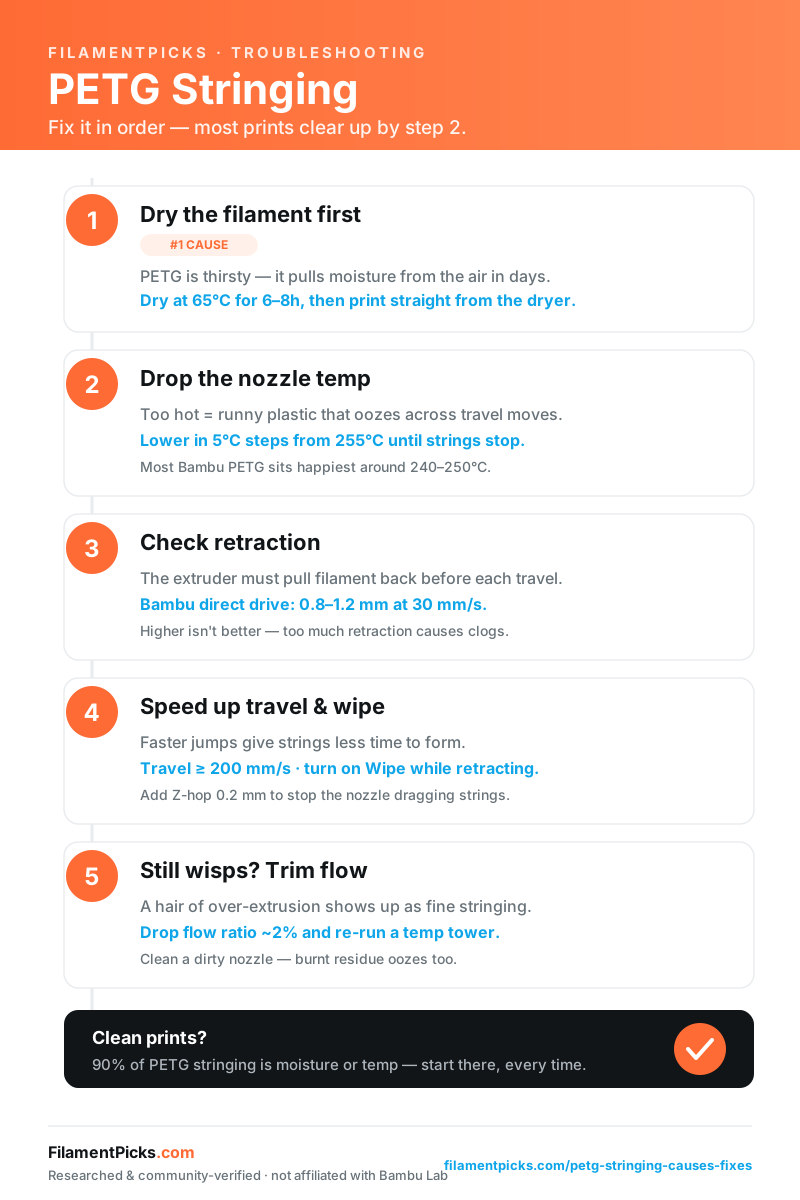
PETG Stringing — Fix It in Order
The five fixes that clear up almost all PETG stringing, in the exact order to try them. Save it, print it, or pin it next to your printer.
Read the full guide →Popular Guides