

As an Amazon Associate I earn from qualifying purchases. This doesn’t affect our findings — see our research method.
X2D filament compatibility is a different question than it was on any previous Bambu printer — because for the first time in the X series, you’re not managing one nozzle, you’re managing two with very different rules. The main direct-drive hotend handles nearly everything, the Bowden-fed auxiliary nozzle is far pickier, and the filament track switch adds its own list of materials it actively dislikes.
This guide pulls the rules together from Bambu Lab’s official X2D compatibility documentation, the X2D FAQ, and community reports — so you can check a spool in seconds instead of finding out mid-print.
Reliable main-nozzle feeding and a dedicated profile make it the easiest third-party recommendation here.
Get 15% off at Polymaker →Use code BALUTAVLAD on your first order.
See also: Bambu P2S Filament Compatibility Guide
X2D Filament Compatibility at a Glance
The short version of X2D filament compatibility, before we go rule by rule:
| Material | Main nozzle | Auxiliary nozzle | Notes |
|---|---|---|---|
| PLA / PLA Basic | ✅ Ideal | ✅ Recommended (official PLA) | The safest material on both nozzles |
| PETG | ✅ Ideal | ⚠️ Printable, not recommended | Aux nozzle lifting hurts stability with PETG |
| TPU (95A) | ✅ Direct drive = yes | ❌ No (Bowden) | External spool or TPU for AMS only |
| ABS / ASA | ✅ With 65°C chamber | ⚠️ Support pairings only | Heat Mode keeps large parts flat |
| PA (Nylon) / PC | ✅ 300°C covers most | ❌ Not the aux job | Dry first — always |
| PVA / BVOH supports | ✅ Works | ✅ This is what it’s for | The X2D’s signature workflow |
| CF/GF blends (PLA-CF, PETG-CF, PAHT-CF) | ✅ Hardened parts stock | ❌ Keep off aux | ⚠️ through the track switch — see below |
| PLA Aero / ASA-CF | ⚠️ Material OK | ❌ | Strongly discouraged through track switch |
👉 See also: how to reduce purge waste on the Bambu X2D — modes and setup · Bambu X2D nozzle guide — 0.2 vs 0.4 vs 0.6 vs 0.8 mm · Bambu X2D dual-nozzle filament pairing guide — which filaments to run in each nozzle.
The Main Nozzle: 300°C Direct Drive Handles Almost Everything
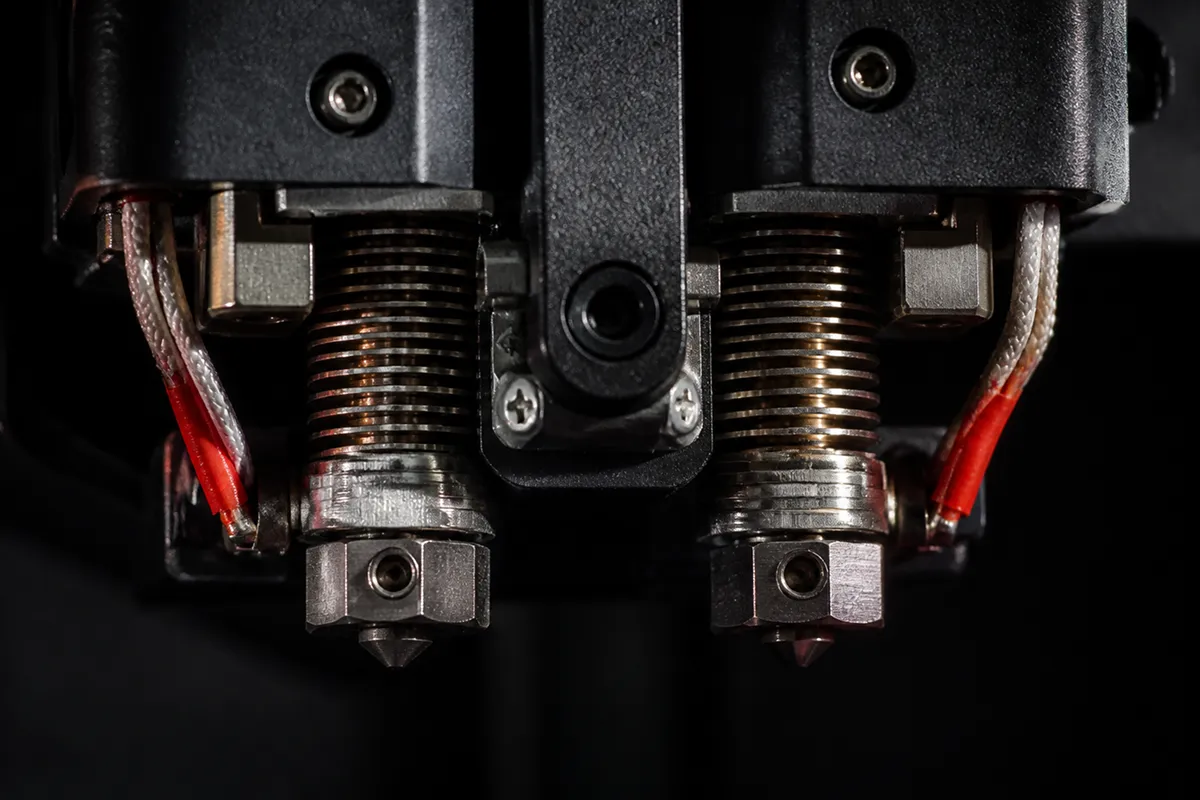
The main hotend is where the X2D behaves like an upgraded X1 Carbon. It’s a direct-drive setup driven by Bambu’s servo extruder with real-time flow sensing, reaching 300°C — enough for PLA, PETG, ABS, ASA, PET, PA (nylon), PC and the carbon/glass-fiber reinforced blends.
Bambu’s own documentation lists all of these as supported on the main nozzle, and community reports since launch back that up: if a filament ran on your X1C or P1S, the main nozzle runs it at least as well, usually better thanks to tangle detection and flow monitoring.
Two practical notes from the X2D filament compatibility reports. First, abrasive fiber-filled filaments still want the hardened nozzle and extruder parts — the X2D ships ready for them, but check your configuration if you bought a base unit. Second, 300°C covers most engineering filaments, not all of them — a handful of high-temperature nylons and PC blends sit at the very edge of the range, so check the spool’s printing temperature before assuming.
The Auxiliary Nozzle: Support Materials First, Everything Else Second
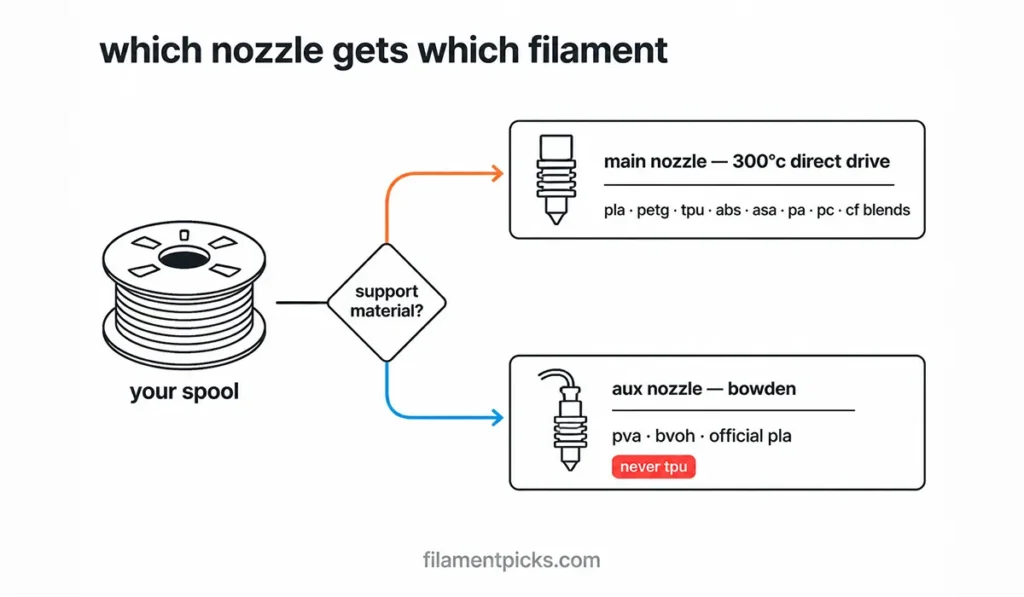
This is where X2D filament compatibility surprises people. The auxiliary nozzle is Bowden-fed from the rear of the machine, raised and lowered by a mechanical lifter — and Bambu is unusually direct about its limits. The auxiliary side has its own four-level compatibility list, and the practical summary is: it exists for support materials (PVA, BVOH, Support for PLA/PETG) and official PLA.
PETG is technically printable on the auxiliary nozzle, but Bambu itself doesn’t recommend it — the frequent raising and lowering of the aux nozzle during printing can affect stability with materials that string or ooze. Bambu also recommends official Bambu filaments on the auxiliary side, noting that third-party spools there may not deliver optimal quality.
That’s not marketing fluff in this case: the aux path is the more mechanically constrained of the two, and the community consensus lines up — keep your interesting materials on the main nozzle, and let the aux nozzle do dedicated support duty. If dissolvable supports are the reason you’re buying the X2D, our support filament guide for Bambu Lab covers the PVA and breakaway options that pair with it.
TPU on the X2D: Finally a Straight Answer
Flexible filament has been the Bambu ecosystem’s sore spot for years — and the X2D is the first X-series machine with a genuinely clean answer. Because the main nozzle is direct drive, standard TPU 95A runs from an external spool without the buckling problems Bowden paths cause with flexibles.
Community pre-launch analysis flagged the X2D’s dedicated TPU feeding path as one of its most meaningful practical upgrades, and post-launch user reports agree: TPU that fought the AMS for years loads and prints without drama on the main nozzle — the single biggest X2D filament compatibility upgrade over the X1 series.
The rules stay strict on the AMS side though: only TPU for AMS (Bambu’s stiffer formulation) belongs in an AMS 2 Pro — standard 95A TPU and softer flexibles still don’t. And TPU never goes through the auxiliary nozzle: flexible filament plus a Bowden tube is exactly the combination the direct-drive main nozzle exists to avoid.
The Filament Track Switch: Read This Before Multi-Material Jobs
If you run multiple AMS units into the X2D, the filament track switch is the component most X2D filament compatibility guides skip — and it has its own blacklist, separate from the hotends. Straight from Bambu’s documentation:
- PLA Aero and ASA-CF: strongly discouraged. These are extremely prone to grinding, feed blockage or breakage inside the PTFE tube after the switch is installed.
- PLA-CF and PLA Glow: high-friction risks. Their feeding resistance makes load/unload failures significantly more likely through the switch.
If one of these filaments misbehaves mid-job, Bambu’s guidance is to manually reassign the AMS slot, and if that fails, disable the track switch for that print. The deeper pattern here matches what we found aggregating hundreds of feed-failure reports in our Bambu AMS jamming data report: most “printer problems” are really filament-path problems, and knowing which materials stress which section of the path prevents the majority of them.
Engineering Filaments and the 65°C Heated Chamber
The X2D pairs its 300°C main nozzle with an actively heated chamber that holds up to 65°C — and for X2D filament compatibility with engineering materials, the chamber matters as much as the nozzle. ABS, ASA and nylon don’t fail on Bambu printers because of temperature limits; they fail because of warping and layer-adhesion problems in an unevenly heated enclosure.
The X2D’s Heat Mode uses a PTC heater and circulation fan to keep the chamber uniform, which is what keeps large engineering prints flat edge to edge. If ABS is your main material, our guide on printing ABS without warping on Bambu Lab pairs directly with this — and the X2D vs X1 Carbon comparison shows how much the heated chamber changes versus the passive X1C enclosure.
One honest caveat from the documentation: filaments needing drying temperatures above 65°C (several nylons and PC blends) can’t be fully dried in an AMS 2 Pro — that’s an AMS HT job. Moisture discipline still decides your results with hygroscopic materials; our filament storage guide covers the routine.
Why the chamber matters: The 65°C actively heated chamber is what unlocks ABS, ASA and nylon on the X2D. Image: Bambu Lab (official product imagery).
AMS Limits: 24 Slots, But Not Everything Belongs Inside
On paper the numbers are wild: a single-hotend X2D setup supports up to 4 AMS 2 Pro plus 8 AMS HT units — 12 units and 24 slots — and dual-hotend configurations reach 25-color printing. In practice, X2D filament compatibility inside the AMS follows the same rules as every AMS 2 Pro: plastic spools between 50–68 mm width, cardboard spools only with adapter rings, no soft flexibles, and damp PVA never.
We’ve broken those rules down slot by slot in the AMS 2 Pro filament compatibility guide, and you can check any specific printer + material combination in our free Bambu Filament Compatibility Checker.
Quick Picks: Filaments That Just Work on the X2D
| Use case | Pick | Why |
|---|---|---|
| Everyday + aux nozzle | Bambu PLA Basic | RFID auto-setup, recommended on both nozzles |
| Functional parts | Polymaker PETG 15% off first order with code BALUTAVLAD | Community favorite for reliability on the main nozzle |
| Flexible parts | Bambu TPU for AMS | The only flexible cleared for AMS slots |
| Dissolvable supports | PVA (keep it dry) | The aux nozzle’s reason to exist |
For ranked picks per material with full reasoning, see Best Filament for Bambu X2D: Every Material Reviewed.
Setup Details That Quietly Affect Compatibility
Three hardware details from the official FAQ round out the compatibility picture. First, build plates: the X2D supports all current Bambu Lab 256 mm × 256 mm plates, so everything you learned about plate pairing carries over — textured PEI for PETG with a release layer, smooth plates where finish matters.
Second, the two hotends are structurally identical and can be swapped between the left and right positions, which simplifies spares: one hotend model covers both slots, and a clogged aux nozzle can be rotated out in minutes. Third, speed is a compatibility factor people forget: the X2D moves at up to 1,000 mm/s, but almost no filament tolerates that ceiling — high-speed PLA and PETG formulations hold quality at speeds where standard spools visibly under-extrude.
The printer sets the ceiling; the material decides how close you get to it.
One more note for multi-AMS owners: only one of the two 6-pin ports on the buffer feeds AMS units — the other is reserved for the chamber exhaust fan. Multiple AMS units daisy-chain rather than connecting in parallel, which matters when you’re planning where dried engineering spools physically live in the chain.
Frequently Asked Questions
Can the Bambu X2D print TPU?
Yes — and better than any previous X-series printer. Standard TPU 95A runs from an external spool on the direct-drive main nozzle. Inside the AMS, only Bambu’s TPU for AMS is supported; never feed TPU through the Bowden auxiliary nozzle.
Can I use third-party filament on the auxiliary nozzle?
You can, but Bambu recommends official filaments there — especially official PLA — and community reports agree that the aux path is the pickier one. X2D filament compatibility problems reported on the aux side usually trace back to stringy or non-standard third-party spools.
Which filaments should never go through the filament track switch?
Bambu strongly discourages PLA Aero and ASA-CF (grinding and PTFE-path blockages), and flags PLA-CF and PLA Glow as load/unload failure risks. Keep those on a direct AMS slot or external spool.
Does the X2D need a hardened nozzle for carbon fiber filaments?
Yes — CF and GF blends remain abrasive regardless of printer. The X2D’s stock configuration is built for them, but verify your unit’s nozzle spec before running fiber-filled spools regularly.
What build plates does the X2D support?
All current Bambu Lab 256 mm × 256 mm build plates work on the X2D — no plate repurchasing needed when upgrading from an X1C, P1S or P2S. Match the plate to the material as usual: textured PEI for PETG, and a glue-stick release layer where adhesion runs too strong.
The Verdict
X2D filament compatibility comes down to three rules. Give the 300°C direct-drive main nozzle anything mainstream or engineering-grade — with the 65°C chamber handling the warpers. Treat the auxiliary nozzle as a dedicated support-material tool, not a second main nozzle. And respect the track switch blacklist before multi-AMS jobs. Follow those three and the X2D is the most materially flexible printer Bambu has shipped in the X series — verified against the official documentation and the community’s first months with the machine.
One last habit worth stealing from the community: when a new spool type enters your rotation, run it through the compatibility checker first, print a small calibration part on the main nozzle second, and only then commit it to a long multi-material job. Two minutes of checking consistently beats two hours of clearing a feed path — the same lesson our jamming data kept repeating.
Sources: Bambu Lab X2D filament compatibility documentation, X2D FAQ and product specifications, plus aggregated community reports (r/BambuLab, Bambu Lab Community Forum) current to July 2026. This is a research-based guide — not in-house lab testing.