

Disclosure: FilamentPicks is reader-supported. As an Amazon Associate we earn from qualifying purchases. Polymaker links may also earn us a commission, at no extra cost to you. Editorial recommendations remain independent and follow official manufacturer guidance.
Bambu P1S TPU settings work best with a free-running external spool, a dry filament path and a conservative volumetric-flow limit. The P1S is fast with rigid filament, but soft TPU rewards restraint—not a PLA speed copied into a flexible profile.
Bambu P1S TPU settings that make a sound starting point
Use the profile for the material you actually loaded. The table below applies to generic TPU 95A. It does not replace the technical data sheet on a third-party spool, and it should not be mixed with the much faster profile for the stiffer Bambu TPU for AMS.
| Setting | P1S starting point | Important limit |
|---|---|---|
| Filament profile | Generic TPU | Do not use PLA, Bambu TPU for AMS or 95A HF interchangeably. |
| Nozzle | 0.4 mm | Current generic profiles support 0.4, 0.6 and 0.8 mm; avoid 0.2 mm as a first choice. |
| Nozzle temperature | 240°C | The profile permits 200–250°C; stay within the roll maker’s stated range. |
| Textured PEI / Hot Plate | 35°C | Use the plate preset that matches the physical plate. |
| Cool / Engineering Plate | 30°C | Follow current plate and release-agent guidance. |
| Maximum volumetric speed | 3.2 mm³/s | This is the official generic-profile limit; linear mm/s varies with bead geometry. |
| Layer height | 0.20 mm | A practical test height for a 0.4 mm nozzle, not a material rule. |
| Feeding | Rear external spool holder | Generic TPU/95A is unsupported in AMS and AMS 2 Pro. |
| Drying | Exact spool manufacturer’s TDS | There is no single Bambu drying value for all third-party TPU. |
Need to choose a roll first? Compare the material families in our best TPU for Bambu Lab guide. If TPU is only one of several materials you plan to run, the P1S material ranking explains where it fits.
How to feed TPU from the P1S external spool
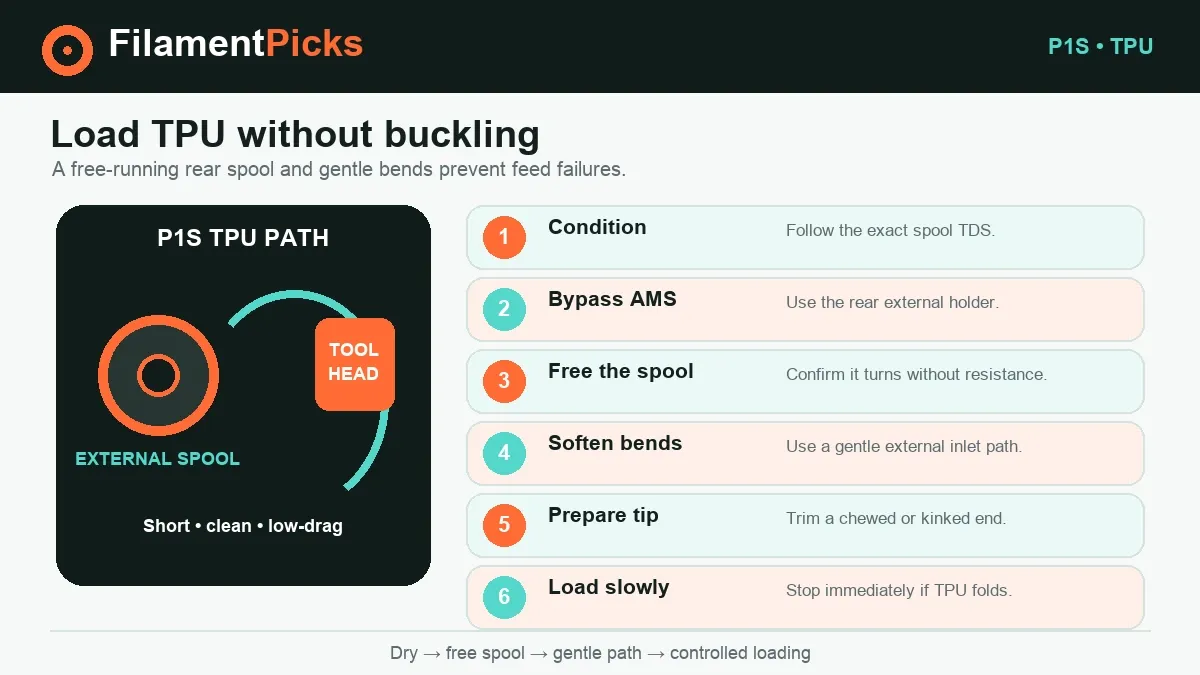
The P1S external holder keeps soft material out of the AMS roller path. It also lets you see spool drag directly, which is useful because a tight spool can look exactly like a slicer problem.
- Condition the filament. If the spool maker gives a drying time and temperature, use those exact instructions. Let the roll cool in a dry container so it does not immediately absorb moisture again.
- Mount the spool on the rear holder. Confirm that it rotates without rubbing the chassis or crossing over itself. Heavy or narrow-center spools may need a smooth, properly sized roller solution.
- Bypass the AMS path. Route the TPU through the normal external inlet with gentle bends. If you disconnect a shared PTFE connection, restore it carefully after the TPU job.
- Load slowly and watch the strand. Cut away a chewed or sharply kinked end. Stop if the filament folds instead of advancing; forcing it usually makes the buckle worse.
- Slice with Generic TPU. Recheck the 0.4 mm nozzle, plate type, 3.2 mm³/s flow ceiling and the roll maker’s temperature range.
- Start with a small validation part. Use a flexible tab, seal section or short wall. A giant first attempt wastes time and can hide the first layer from view.
Should the P1S door be open for TPU?
There is no official universal door-open or door-closed rule for every TPU and every model. Bambu’s TPU data describes a chamber range, while real chamber temperature changes with room temperature, bed setting, model size and print duration. Start with the current P1S material preset rather than turning a forum habit into a permanent rule.
If a long print shows heat-related softening in the feed path, compare chamber conditions with the exact filament’s technical sheet and improve ventilation in a controlled way. If layer bonding is weak, do not automatically add more ventilation. Document the change so a later success is repeatable.
Retraction and stringing
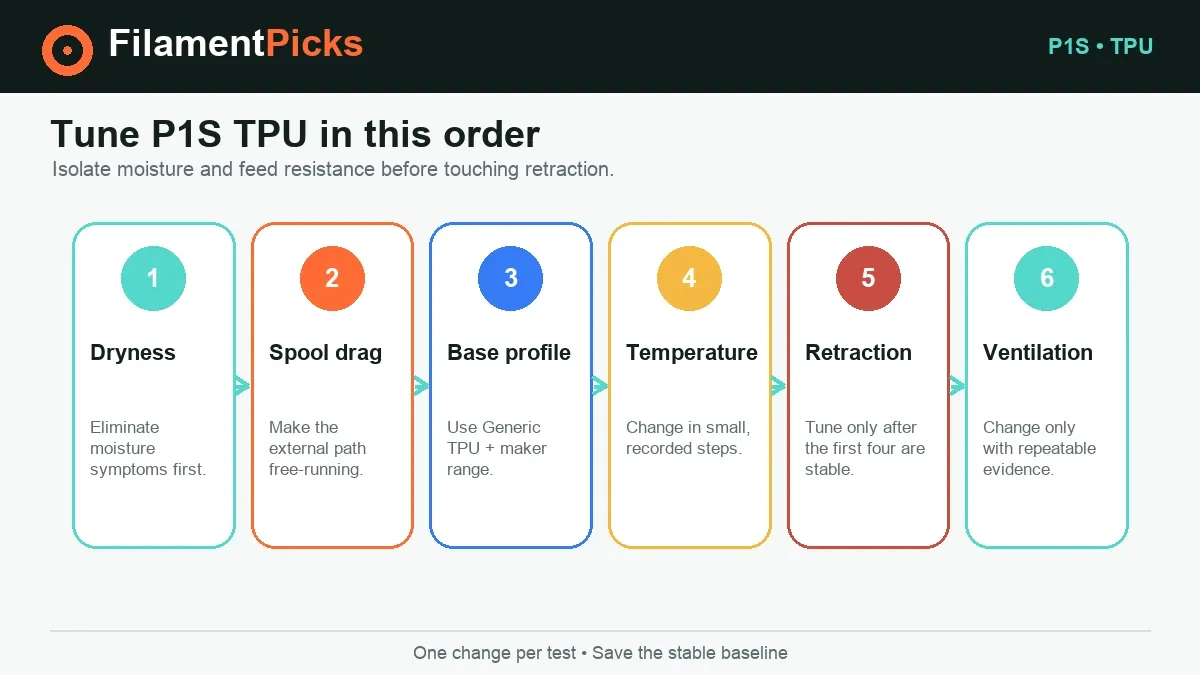
Retraction is not the first knob to turn. Wet TPU oozes, and a dragging spool causes uneven pressure; both can be mistaken for bad retraction. Keep the printer/profile default for the first test, dry the roll, free the feed path, and tune nozzle temperature in roughly 5°C steps within the specified range. Only then make a small retraction test.
Dryness
Listen for popping and inspect for bubbles or a rough, foamy skin. Those signs should be solved before slicer tuning.
Spool resistance
Observe a long extrusion. The rear spool should unwind smoothly without a tight crossing or abrupt pull.
Temperature
Move in small increments inside the brand’s allowed range and judge both stringing and layer strength.
Retraction
Use a controlled tower and small adjustments; avoid copying a distant Bowden printer’s value.
Bambu P1S TPU settings troubleshooting
| Problem | Likely cause | What to do first |
|---|---|---|
| Fine strings everywhere | Moisture, high temperature or travel across gaps | Dry to the exact TDS, then test 5°C cooler if layer bonding remains good. |
| Filament folds while loading | Soft strand pushed against drag or a sharp bend | Unload, cut the damaged end, straighten the route and confirm free spool movement. |
| Intermittent under-extrusion | 3.2 mm³/s limit overridden, spool binds, partial nozzle restriction | Restore Generic TPU flow, inspect the holder and test the 0.4 mm nozzle. |
| Layers split when flexed | Too cool, too much cooling, excessive flow demand or moisture | Verify dryness, then raise temperature in small steps within the roll’s range. |
| Blobs after pauses | Wet filament or long heat exposure | Dry first; then reduce avoidable pauses and check temperature. |
| TPU grips the plate too hard | Release-agent/plate guidance skipped | Let the plate cool fully and follow the plate maker’s current separation instructions. |
Our broader Bambu TPU guide covers model design and flexible-part orientation. If your main uncertainty is moisture rather than slicing, use the filament drying temperature and time guide—then verify the result against the exact spool’s TDS.
Can P1S print TPU from AMS or AMS 2 Pro?
Generic TPU and ordinary TPU 95A: no. Bambu lists them as unsupported in the original AMS and AMS 2 Pro. The safe route is the P1S external spool holder.
Bambu TPU for AMS: yes, with the named compatible system and its dedicated profile. This special filament is 68D, not 95A. Its P1S-capable profile uses a 230°C baseline and 18 mm³/s maximum volumetric speed, while the product data calls for a 30–35°C bed, drying at 70°C for eight hours and storage/printing below 20% RH. Copying those faster values to soft generic 95A can cause a failed feed.
AMS lite is not an accessory for the P1 series. Do not interpret a material’s AMS lite compatibility as P1S system compatibility. For the complete material matrix, see our AMS 2 Pro filament compatibility guide.
Need a soft TPU roll?
Compare Polymaker TPU options, then feed a compatible 95A roll from the P1S rear external holder—not through AMS.
Use code BALUTAVLAD at checkout.
Explore Polymaker TPU →Store the dried roll
A sealed dry box reduces moisture pickup between jobs. Verify spool clearance and keep the feed path free of sharp bends.
Browse dry boxes on Amazon →Frequently asked questions
What profile should I use for TPU 95A on P1S?
Start with Generic TPU: 240°C nozzle, 35°C Textured PEI/Hot Plate, 3.2 mm³/s maximum volumetric speed, 0.4 mm nozzle and external-spool feeding. Respect any narrower limits printed by the filament manufacturer.
Can I put TPU 95A in AMS 2 Pro?
No. Bambu lists generic TPU and TPU 95A as unsupported. “TPU for AMS” is a separate, much stiffer 68D product and must use its own profile.
What P1S speed should I use for TPU?
Use 3.2 mm³/s as the generic profile’s initial flow ceiling. Slicer linear speeds will vary with layer height and line width, so a single mm/s answer is incomplete.
Should I turn off retraction?
Do not make that your first move. Begin with the current profile, fix moisture and feed resistance, and tune temperature. If stringing remains, run a small controlled retraction test rather than applying a universal value.
Does the P1S need the door open?
There is no one official rule for every TPU job. Monitor the chamber and follow the exact material’s data. Change ventilation only in response to evidence from a repeatable test.
Can I use Bambu TPU 95A HF settings for third-party 95A?
Not automatically. Bambu TPU 95A HF has its own 12 mm³/s profile and product-specific drying guidance. Generic 95A starts far more conservatively at 3.2 mm³/s.