

Prusa Debuts Free Web App That Brings Studio-Style Lighting Effects to 3D Prints
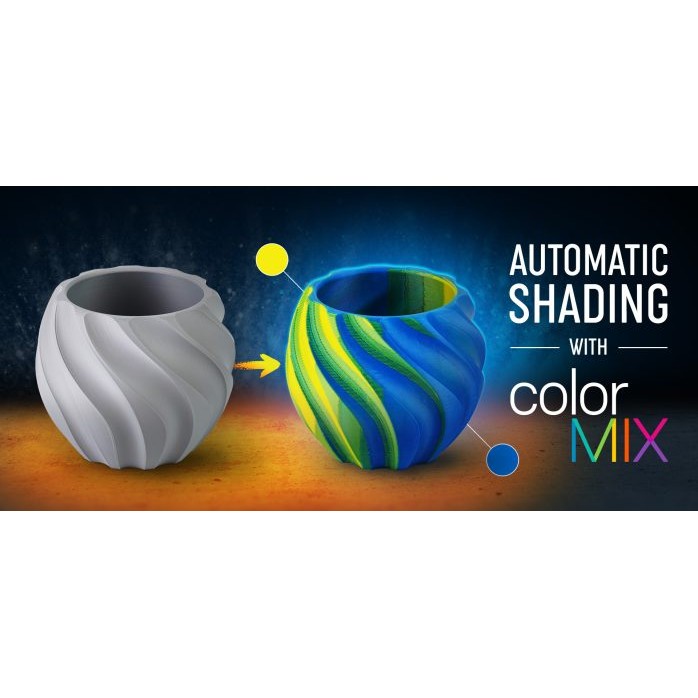
Prusa Research has introduced a new browser-based tool that allows makers to simulate realistic studio lighting and shading directly on their 3D-printed models. The application builds on ColorMix, the filament-blending system Prusa launched just days earlier, and represents one of the more creative software releases the company has shipped in recent months. Rather than requiring a multi-material printer loaded with dozens of specialty filaments, the new tool calculates how light would naturally fall across a model’s surface and translates that into subtle color gradients that can be reproduced using filaments most makers already have on hand.
From Flat Filament to Dimensional Depth
Traditional single-color 3D prints often look flat under normal lighting, lacking the depth cues that painted miniatures or photographed products typically have. Prusa’s new app addresses this by analyzing the geometry of an uploaded model and identifying where a virtual light source would create highlights, midtones, and shadows. That lighting map is then converted into a series of filament blends generated through ColorMix, so that areas of the print that would naturally sit in shadow receive a slightly darker or cooler-toned mix, while areas that would catch light receive a brighter or warmer blend.
Key Features of the Auto-Shading Tool
- Automatic lighting analysis: the tool reads the model’s mesh and calculates virtual highlight and shadow regions without any manual masking.
- ColorMix-powered gradients: shading is achieved by blending existing filament colors into intermediate tones, rather than requiring new spools.
- Browser-based, no installation: the app runs entirely online, making it accessible to anyone with a web browser, regardless of which slicer they normally use.
- Export-ready output: the generated color data can be applied to a model before slicing, so the shading effect is baked directly into the physical print.
How It Fits Into a Multi-Material Workflow
The tool is most powerful when paired with a multi-material setup, where a printer can switch between several filament colors within a single print. On Prusa’s own XL with multiple tool heads, or on printers using an MMU-style filament changer, the calculated gradient can be distributed across multiple loaded spools with fine control over where each tone transitions. For single-extruder printers without color-switching hardware, the same lighting calculations can still inform which single blended filament color will best represent the ‘average’ lighting of a model, or guide manual filament swaps at specific layer heights for a simplified two-tone shading effect.
Because the underlying ColorMix engine works by calculating blend ratios between existing filament colors rather than demanding new proprietary materials, the barrier to entry for this feature is unusually low. A maker with a basic set of primary-color filaments can theoretically generate a wide range of shaded outputs without any additional purchases, which is a notable departure from how most ‘premium’ print-finishing techniques are usually marketed.

Why This Matters to the Community
For the broader US 3D printing community, this release is significant because it tackles one of the most persistent gaps between desktop 3D printing and traditionally finished products: the appearance of depth and realism without post-processing. Owners of Bambu Lab printers equipped with the AMS or AMS Lite have spent years experimenting with multi-color prints, but achieving a convincing shaded or ‘painted’ look has typically required third-party tools, manual color-mapping in Bambu Studio’s color paint feature, or significant trial and error. A free, automated lighting-to-filament-blend pipeline — even one developed primarily for Prusa’s own ecosystem — creates a useful reference point for how slicer-level color tools should evolve across the industry, including for Bambu Studio’s multi-AMS workflows.
For the Prusa community specifically, particularly owners of the MK4S with the Multi Material Unit 3 or the XL with multiple toolheads, this is a direct, practical addition to an already-growing color ecosystem. Combined with ColorMix’s blend-generation capabilities, it effectively turns a modest filament collection into a much larger virtual palette, and now extends that palette into the realm of shading and lighting rather than just flat color selection. This could meaningfully change how hobbyists approach printing miniatures, display models, cosplay props, and architectural visualizations, all of which benefit enormously from the illusion of depth.
Creality and Voron users, many of whom run heavily customized multi-material setups (including ERCF, Box Turtle, and other open-source filament-switching systems popular in the Voron community), won’t get native access to Prusa’s specific web app, but the underlying concept — procedural shading via filament blending — is exactly the kind of feature that tends to get reverse-engineered or reimplemented in open-source slicers like OrcaSlicer and SuperSlicer. Given how quickly community developers have historically adapted Prusa-originated features (multi-material color painting, variable layer height, and organic supports all followed similar trajectories), it’s plausible that an open-source equivalent could surface within OrcaSlicer’s color tools, benefiting the entire ecosystem of Klipper-based and Voron-style printers regardless of brand.
More broadly, tools like this lower the skill ceiling for achieving professional-looking results, which matters enormously for the Etsy sellers, tabletop gaming communities, and prop-makers who make up a large segment of the US maker economy. A free, browser-based shading tool that doesn’t require specialized hardware or paid software subscriptions is the kind of release that tends to get adopted quickly and discussed widely across maker forums and Discord servers.
Image credit: Prusa Research Blog / Brand Official