

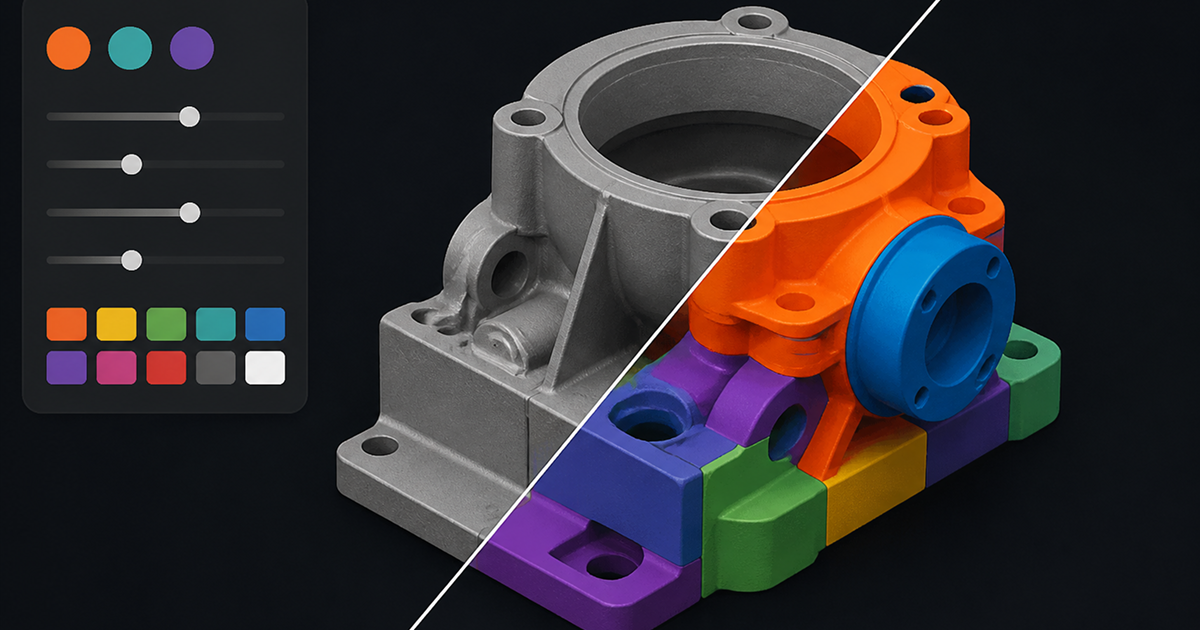
Bambu Lab shipped Bambu Studio 2.7.1 on June 1, 2026, headlined by a new Texture-to-Color Painting tool that converts surface textures on imported models directly into multicolor paint instructions. The update also brings a redesigned Filament Manager and a Gradient Color Curve panel for smoother color transitions on multi-AMS prints.
What This Means for Bambu Lab Users
For owners of AMS-equipped Bambu Lab printers, 2.7.1 removes a tedious manual step: instead of hand-painting color zones on a model, Texture-to-Color Painting reads the texture or normal map on imported 3MF and OBJ files and automatically assigns paint regions based on texture variation. Combined with the new Filament Manager, which centralizes filament profiles, AMS slot assignments, and material settings in one panel, multicolor projects should take noticeably less setup time.
New Features in Detail
- Texture-to-Color Painting: auto-detects texture and normal map data on imported models and converts it into paintable color regions, with adjustable sensitivity and region merging.
- Filament Manager: a single panel for managing filament profiles, AMS slot mapping, and per-filament print settings, replacing several scattered menus from earlier versions.
- Gradient Color Curve Panel: lets users define custom gradient curves between two or more filament colors for smoother transitions on vases, gradients, and dual-tone prints.
Availability
Bambu Studio 2.7.1 is available now as a free update for Windows, macOS, and Linux from the official Bambu Lab website and through the in-app updater. It works with all current Bambu Lab printers, though Texture-to-Color Painting and the Gradient Color Curve panel are most useful on AMS-equipped models such as the A1, A1 mini, P1S, X1 series, and A2L.
What’s Next
Bambu Lab has not announced a firm date for the next point release, but the 2.7.x branch has shipped roughly monthly updates so far in 2026, and community feedback on Texture-to-Color Painting’s accuracy is likely to shape refinements in 2.7.2.
Source: Bambu Lab Wiki